
What is Geometry Dash?
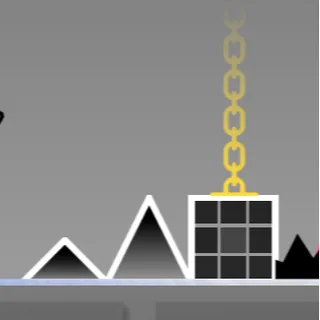
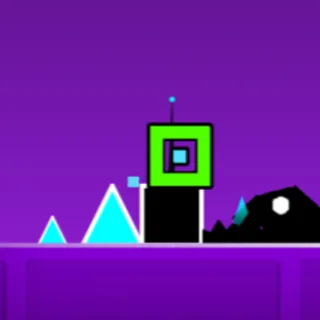
Geometry Dash is a platformer with one button. A cube slides to the right at a speed you cannot change, spikes and gaps arrive in patterns written to the music, and a press makes the cube jump. Touch anything and you are back at the start of the level with the song restarting. Portals change what you are: a ship that climbs while you hold, a ball that flips gravity, a UFO that hops, a wave that draws diagonals. The button never changes; what it does keeps changing.
RobTop Games released it in 2013 and it has never left the charts, because the idea is complete. There is no luck, no enemy AI, no loot. There is a level, a song and your memory of both, and the moment you clear a section that killed you forty times feels like nothing else in games. The build hosted here is the well-known Scratch port of the early official levels, running in your browser with practice mode, coins and the level select intact.
How to play Geometry Dash
- Press Play above. The level menu loads; use the arrows to pick a level. Stereo Madness is the first.
- Tap, click or press Space to jump. Hold it to chain jumps across yellow rings.
- Go through a portal and think about the new form for a beat: hold to fly the ship, press to flip the ball.
- Die, learn the section, retry. The level is identical every attempt, so every death is information.
- Use practice mode for the section that keeps killing you, then finish the level in normal mode for the completion.
The thing new players miss: yellow pads fire on their own and yellow rings only fire when you press while touching them. Pressing on a pad double-jumps you into the ceiling, and that single mistake accounts for most early deaths.
Geometry Dash controls
| Action | Desktop | Phone / tablet |
|---|---|---|
| Jump (cube, robot) | Space, Up arrow or click | Tap |
| Fly (ship, UFO) | Hold to rise, release to fall | Hold, release |
| Flip gravity (ball, spider) | Press once | Tap once |
| Wave | Hold for up, release for down | Hold, release |
| Practice checkpoint | Z to place, X to remove | On-screen buttons |
| Pause | Escape or the pause button | Pause button |
| Fullscreen | The icon under the player | The icon under the player |
Forms, portals and orbs
- Cube. A fixed-height jump. Late over single spikes, early over gaps.
- Ship. Hold to climb, release to dive. Fly it in taps; a held press hits the roof.
- Ball. Each press flips gravity. One press per obstacle.
- UFO. Each press is a small hop. Steady taps, no big corrections.
- Wave. Diagonal up while held, diagonal down when released.
- Robot. Jump height depends on how long you hold.
- Spider. Teleports to the opposite surface instantly.
- Orbs and pads. Yellow launches, pink is a small jump, blue flips gravity, green flips and jumps. Pads fire on their own; rings need a press.
- Other portals. Mini shrinks you, speed portals change the tempo, mirror flips the screen. Each one comes with a change in the music.
Tips for finishing levels
- Play with sound. The jumps are on the beat. A level you have heard ten times is easier than one you have watched ten times.
- Learn in chunks. Each level is a few sections. Clear each from a practice checkpoint, then run the whole thing.
- Tap the ship. Almost every ship death is a held button.
- Do not press on pads. They launch you already.
- Watch the cube, not the screen. When the camera zooms or the colours flash, the timing has not changed.
- Stop after twenty minutes. Attempts get worse when you are tired. The pattern settles overnight and the level is often a first-try clear the next day.
Playing Geometry Dash on a phone, tablet or Chromebook
The game was built for touch, and the browser build keeps that: tap anywhere to jump, hold to fly. On a phone, turn it sideways and use the fullscreen button under the player so the level fills the screen and the timing is easier to read. A Chromebook or laptop uses the space bar or a click; there is no other key to learn. The build loads in a few seconds and keeps your completions and coins in the browser’s storage.
Why Geometry Dash is still worth playing
Plenty of one-button games are hard. Geometry Dash is hard in a way that teaches you: the level does not change, the song tells you when to press, and the distance between your best attempt and a completion is always visible as a percentage. It turns frustration into progress with nothing but honesty, and a decade of clones has not managed to copy that.
Frequently asked questions about Geometry Dash
Is Geometry Dash free to play here?
Yes. The game runs directly in this page. There is nothing to download or install and no account to create. Press Play and the level menu loads.
What is Geometry Dash?
Geometry Dash is a rhythm platformer released by RobTop Games in 2013. A cube moves at a fixed speed through levels of spikes and gaps set to music, and one press makes it jump. Portals turn it into a ship, a ball, a UFO, a wave, a robot or a spider, each of which uses the same button differently. Touching anything sends you back to the start.
Which version is this?
The browser build here is the well-known Scratch port of the early official levels by Griffpatch, packaged so it runs in a modern browser. The level layouts, music cues and practice mode match the original. Geometry Dash itself belongs to RobTop Games.
Does my progress save?
Yes. Completed levels and coins are kept in this browser on this device. A private window, cleared site data or a different device starts fresh.
What is practice mode?
A mode where you place checkpoints inside a level and restart from them instead of from the beginning. It is for learning a hard section. Finishing a level in practice mode does not count as a completion; run it in normal mode afterwards.
What do the coloured rings and pads do?
Yellow launches you: a pad fires on its own, a ring only when you press while touching it. Pink is a smaller jump. Blue flips gravity. Green flips gravity and jumps. The mistake everyone makes is pressing on a yellow pad, which double-jumps you into the ceiling.
Why do I keep dying in ship sections?
Because holding the button makes the ship climb until it hits the roof. Fly it in short taps, only holding for a real climb. Gravity portals reverse which way it falls.
Can I play Geometry Dash on a phone or tablet?
Yes. Tap anywhere on the game to jump, and hold to fly. The fullscreen button under the player gives it the whole screen, which helps with timing.
What is the hardest level here?
Of the early levels, most players find the ship section at the end of Dry Out the first real wall, then Jumper for the ball and xStep for the UFO. Practice mode exists for exactly those.